ClientManager · Navigation
My Tasks Navigation Tree
The single page under this category, with real fields/buttons pulled directly from MyTasks.razor and ChecklistTaskRow.razor, plus a live screenshot from cmdemo.
Reading this tree: Level 1 is this category. Level 2 is the page. This category has no sub-tabs or sections - it's one flat page.
2My Tasks1 page
My Tasks/my-tasks
Personal onboarding steps and recurring duties, auto-seeded from whatever Role Checklists apply to the logged-in user's Role(s) - nobody manually assigns these. Grouped into One-Time (pending), Ongoing Duties (recurring, never fully "done"), and Completed (one-time items already checked off). A user holding more than one Role sees items grouped by Role in a tree; a single-Role user (the common case) sees one flat list. First login shows a dismissible banner prompting the user to confirm they've reviewed onboarding.
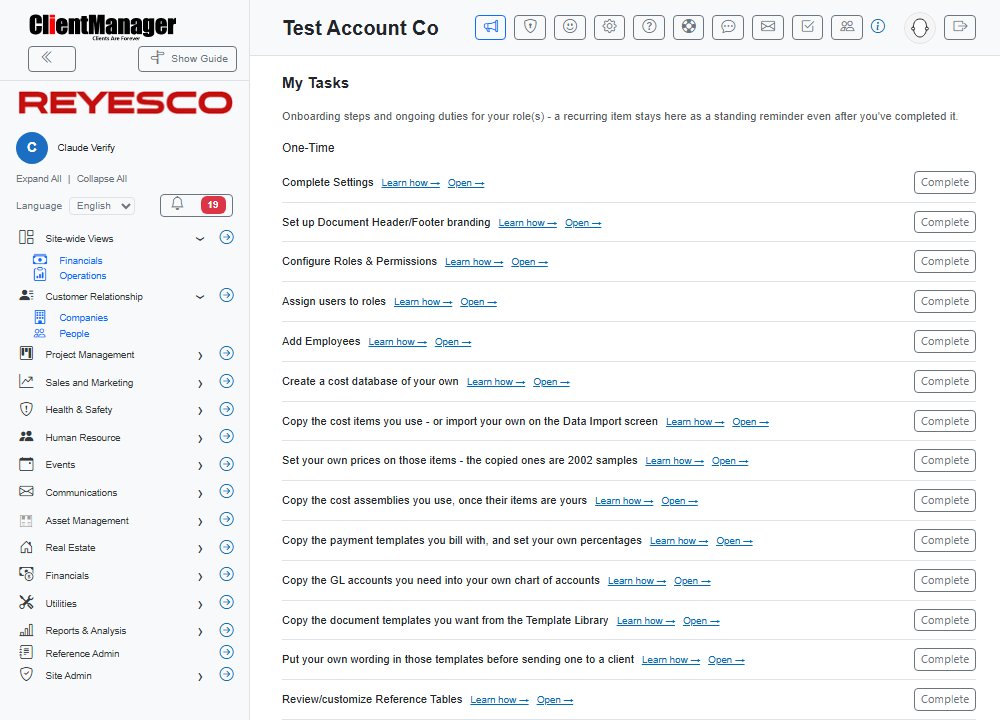
Live cmdemo, 2026-09-14 — this account holds multiple Roles, so items render as a Role-grouped tree (Administrators / Users) rather than a flat list
Per-item fields (read-only, not user-editable)
- Description — the task/duty text
- Learn how — optional link to a guide, when the checklist item has one
- Go to Settings — optional deep link to wherever the item is actually completed, when set
- Last done / Completed date — shown once an item has a completion date on record
Buttons
- Complete
- Mark Done (recurring items)
- I'm all set - stop showing me this (first-login banner only)